AWS Networking Certification Training in Gurgaon
- Enroll for Cloud Architecture, Developer, Operations, DevOps, AI / ML, Networking and Security Certifications
- Experience blended learning through interactive offline and online sessions.
- Job Assured Course

- Course Duration - 3 months
- Get Trained from Industry Experts
Train using realtime course materials using online portals & trainer experience to get a personalized teaching experience.
Active interaction in sessions guided by leading professionals from the industry
Gain professionals insights through leading industry experts across domains
Enhance your career with 42+ in-demand skills and 20+ services
AWS Networking Certification Overview
This AWS live-learning courses cover deep into designing, developing, deploying, and managing scalable solutions and infrastructure across AWS platforms, equipping you for success in today’s fast-evolving technology landscape
- Benefit from ongoing access to all self-paced videos and archived session recordings
- Success Aimers supports you in gaining visibility among leading employers
- Get prepared for 10+ AWS official certifications with our role based courses tailored to your specific needs
- Engage with real-world capstone projects
- Engage in live virtual classes led by industry experts, complemented by hands-on projects
- Learn 42+ In-Demand Skills & 20+ Services
- Job interview rehearsal sessions
Design and implement computer and information networks, including local area networks (LAN), wide area networks (WAN), intranets, extranets, and similar systems


What is AWS Certified Engineer?
AWS Certified Engineers are essential for driving cloud innovation in software development and testing. They manage the full deployment cycle, building and maintaining DevOps pipelines for Application deployment and workflows, and also automating deployment and testing processes. By automating workflows and resolving challenges in deployment, and maintenance, they help organizations deliver reliable, high-performance & faster and more efficiently.
The role of AWS Certified Engineer?
AWS Certified Cloud Engineers in software development and testing oversees the end-to-end lifecycle of web applications, from development to deployment and system performance optimization. Key responsibilities include:
Exploring Emerging Technologies: Leveraging Cloud technologies, Cloud netwtorking, and security techniques to enhance efficiency and streamline deployment workflows.
Scalable AI Development: Designing and implementing web applications that address critical business needs.
Seamless Deployment: Coordinating web deployment with infrastructure management for smooth delivery.
Workflow Optimization: Creating, analyzing, and refining automation scripts and deployment workflows to maximize productivity.
For professionals aspiring to excel in this field, the Success Aimers AWS Certified Cloud Engineers Course provides hands-on training to master these skills. The program equips you to confidently manage deployment lifecycles, deployment pipelines, automation, and deployment processes, positioning you as a high-impact AWS Certified Cloud Engineers engineer in software development and testing.”**
Who should take this AWS Certified Cloud Engineers course?
The AWS Certified Cloud Engineer Course is tailored for professionals aiming to accelerate their careers in Cloud, data, and technology-driven sectors. It is particularly valuable for roles including:
Cloud Team Leaders
Software and DevOps Developers
Cloud Engineers and IT Managers
Cloud & Infrastructure Engineers
Cloud Researchers and Application Engineers
This program equips participants with the skills to lead DevOps & infrastructure initiatives, implement advanced deployment workflows, and drive innovation in software development and testing.
What are the prerequisites of AWS Certified Cloud Engineer Course?
Prerequisites for the AWS Certified Cloud Engineer Certification Course”
To ensure a seamless learning experience, candidates are expected to have:
Educational Background: An undergraduate degree or high school diploma in a relevant field.
Technical Foundation: Knowledge of IT, software development, or data science fundamentals.
Programming Skills: Basic proficiency in languages such as Python or JavaScript.
Cloud Familiarity: Experience with cloud platforms like AWS or Microsoft Azure.
Meeting these prerequisites enables learners to effectively grasp advanced Cloud concepts, including DevOps tool, pipeline workflows, Webapp deployment, and automation throughout the course.
Which jobs can I get after a AWS Certified Cloud Engineer Certification Course?
- AWS Certified Cloud Engineer
- SRE Reliability Engineer
- Cloud Solutions Release Manager
- Infrastructure/Cloud Automation Engineer
- Cloud Engineer / Cloud Architect
- Cloud Infrastructure Engineer
- Cloud Deployment Engineer
| Training Options | Weekdays (Mon-Fri) | Weekends (Sat-Sun) | Fast Track |
|---|---|---|---|
| Duration of Course | 2 months | 3 months | 15 days |
| Hours / day | 1-2 hours | 2-3 hours | 5 hours |
| Mode of Training | Offline / Online | Offline / Online | Offline / Online |
AWS Certified Cloud Network Engineer Course Overview
This AWS Cloud Certification training enhances your career after chosing the relevant certification path based on the roles. You can practice with hands-on labs and capstone projects and gain proficiency with AWS tools. After completion of the course, you can leverage Job assistance services and enhance career prospects.
Network Engineer
AWS Advanced Networking Speciality Certification Course (ANS-C01)
Introduction
- Overview of AWS Networking - A Bird's eye view (MUST WATCH)
- AWS Networking fundamentals
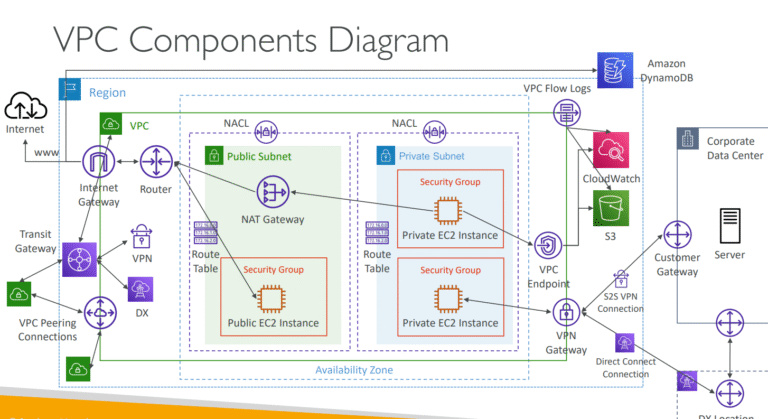
Amazon VPC Fundamentals
- Introduction
- What is Amazon VPC?
- Scope of VPC with respect to AWS Account, Region & AZ
- VPC Building blocks - core components
- VPC Addressing (CIDR)
- VPC Route Tables
- IP Addresses - IPv4 vs IPv6, Private vs Public vs Elastic IP
- VPC Firewall - Security Group
- VPC Firewall - Network Access Control List (NACL)
- Default VPC
- [Important] AWS Console UI Update
- Hands On: Creating VPC with Public Subnet
- Hands On: Add Private subnet
- NAT Gateway
- Create NAT Gateway
- NAT Gateway High Availability
- NAT Instance (EC2 based NAT)
Additional VPC Features
- Egress-only Internet Gateway (IPv6)
- Hands-on: Egress-only internet gateway for IPv6 outbound traffic
- Extending VPC address space
- Elastic Network Interface (ENI) deep dive
- Bring Your Own IP
VPC DNS and DHCP
- Section Introduction - How DNS works?
- Amazon VPC DNS Server (Route53 Resolver)
- VPC DHCP Option sets
- Hands On: VPC DNS with Route53 Private Hosted zone
- Hands On: VPC DNS with custom DNS server
- Introduction to Route53 DNS Resolver Endpoints (Hybrid DNS)
Network Performance and Optimization
- Basics of Network performance - Bandwidth, Latency, Jitter, Throughput, PPS, MTU
- Placement Groups and EBS Optimized EC2 instances
- Enhanced Networking
- DPDK and Elastic Fabric Adapter (EFA)
- Bandwidth Limits inside and outside of VPC
- Network I/O credits
- Network performance Summary
VPC Traffic Monitoring, Troubleshooting & Analysis
- Introduction
- VPC Traffic Monitoring with VPC Flow logs
- VPC Traffic Mirroring
- VPC features for Network Analysis
- VPC Reachability Analyzer
- Walkthrough: VPC Reachability Analyzer
- Walkthrough: VPC Network Access Analyzer
VPC Private Connectivity: VPC Peering
- Introduction to VPC private connectivity options
- VPC Peering
- Hands On: VPC Peering across AWS regions
- VPC Peering invalid scenarios
VPC Private Connectivity: VPC Endpoint & Private Link
- Introduction to VPC Endpoint and Private Link
- VPC Gateway Endpoint
- Hands On: VPC Gateway endpoint to access S3 bucket
- Introduction to VPC Private Link powered endpoints
- VPC Private Link - Important to know features
- VPC endpoint DNS
- Hands On: VPC interface endpoint to access Amazon SQS queue
- VPC Endpoint Service
- Hands On: Create VPC endpoint service and access through VPC endpoint
- Hands On: Accessing VPC endpoint service using Custom Domain Name (DNS)
- VPC endpoints security
- Other VPC endpoint types - Gateway Load Balancer, Resource, Service-network
- VPC Endpoint architectures - Accessing on-premises services
- VPC Endpoint architectures - Accessing from peered or connected VPC
- VPC Endpoint architectures - Accessing from on-premises network
- VPC Endpoint architectures - Centralized VPC endpoints
- VPC Peering vs VPC Endpoints
Transit Gateway
- Introduction to Transit Gateway
- Transit Gateway VPC attachments and Routing
- Hands On: Transit Gateway & VPCs with full routing
- Hands On: Transit Gateway & VPCs with restricted routing
- Hands On: Transit Gateway & VPCs with restricted routing
- Transit Gateway VPC Network Patterns
- Transit Gateway AZ considerations
- Transit Gateway AZ affinity & Appliance mode
- Transit Gateway Peering
- Transit Gateway Connect Attachment
- Transit Gateway VPN Attachment
- Transit Gateway & Direct Connect
- Transit Gateway Multicast
- TGW Architecture: Centralized egress internet
- TGW Architecture: Centralized traffic inspection with Gateway Load Balancer
- TGW Architecture: Centralized VPC interface endpoints
- Transit Gateway vs VPC Peering
- Transit Gateway Sharing
Hybrid Network Basics
- Introduction to Hybrid networking
- Static Routing vs Dynamic Routing
- How Border Gateway Protocol (BGP) works?
- BGP Route selection - ASPATH, LOCAL_PREF, MED
AWS Site-to-Site VPN
- Introduction to AWS Site-to-Site VPN
- IPv4 and IPv6 traffic over AWS Site-to-Site VPN
- Hands On: Setup AWS Site-to-Site VPN
- Accelerated Site-to-Site VPN (Using AWS Global Accelerator)
- VPN NAT Traversal (NAT-T)
- VPN Route Propagation (Static vs Dynamic)
- VPN Transitive Routing scenarios
- VPN Tunnels - Active/Passive Mode
- VPN Dead Peer Detection (DPD)
- VPN Monitoring
- AWS Site-to-Site VPN Architectures
- AWS VPN CloudHub
- EC2 based VPN
- AWS Transit VPC architecture using VPN connections
AWS Client VPN
- Introduction to AWS Client VPN
- Hands On: Setup the AWS Client VPN
- Hands On: Accessing VPC internet gateway over the Client VPN connection
- Hands On: Client VPN Split Tunnel
- Hands On: Accessing VPC peering connection over a Client VPN
Direct Connect (DX)
- Introduction to AWS Direct Connect
- Direct Connect network requirements
- BGP Autonomous System (AS) and ASN
- Direct Connect Connection Types - Dedicated vs Hosted
- Steps to create Direct Connect Connections
- Walkthrough: Creating a DX Connection
- Introduction to DX Virtual Interfaces (VIFs)
- DX Virtual Interfaces (VIF) creation parameters
- ip-ranges.json
- Public VIF
- Private VIF
- Transit VIF
- Direct Connect Gateway with Private VIF and VGW
- Direct Connect with Transit VIF and TGW
- Direct Connect SiteLink
- DX Routing policies and BGP communities
- Public VIF Routing policies
- Public VIF routing scenarios
- Public VIF BGP Communities
- Private VIF routing policies and BGP communities
- DX Link Aggregation Groups (LAGs)
- DX Connection Resiliency
- DX Failure detection with BFD
- DX Security & Encryption (VPN over DX and MACSec)
- DX support for MTU and Jumbo Frames
- DX Pricing
- DX Monitoring using CloudWatch
- DX Troubleshooting - Layer1-4
- DX Architecture - Putting it together
- DX Summary and Exam Essentials
AWS Cloud WAN
- What is AWS Cloud WAN?
- Core Network Policy
- Hands-On: Set up AWS Cloud WAN network, Segments & VPC attachments
- Connecting Transit Gateway & Direct Connect
- AWS Cloud WAN Summary
VPC Lattice
- VPC lattice introduction
- VPC lattice components - Lattice Network, Service, Resource and more
- VPC lattice network associations
- VPC lattice traffic flow
- Hands on: VPC lattice service access with custom domain name
- VPC lattice features - Good to know
- VPC lattice common architectures
- VPC lattice section summary
CloudFront
- CloudFront Overview
- CloudFront Origins
- Hands On: CloudFront Origin Groups
- CloudFront Origin Headers
- CloudFront Origin Security
- Hands On: Restrict an ALB to CloudFront
- CloudFront and HTTPS
- End-to-End Encryption in CloudFront
- CloudFront Geo Restrictions
- CloudFront Functions and Lambda@Edge
- Hands On: CloudFront Functions
- CloudFront Cleanup
- AWS Global Accelerator
- Hands On: AWS Global Accelerator
Elastic Load Balancers
- ELB Overview
- Classic Load Balancer
- Application Load Balancer
- Network Load Balancer
- Connection Idle Timeout
- Request Routing Algorithm
- Sticky Sessions (Session Affinity)
- Cross-Zone Load Balancing
- ELB SSL/TLS
- Connection Draining
- X-Forwarded Headers
- Hands On: ALB X-Forwarded Headers
- Proxy Protocol
- Hands On: NLB Proxy Protocol
- gRPC & ALB
- Hybrid Connectivity
- Security Groups Outbound Rules & Managed Prefixes
Route 53
- What is a DNS?
- Route 53 Overview
- Route 53 - Registering a domain
- Route 53 - Creating our first records
- Route 53 - EC2 Setup
- Route 53 – TTL
- Route 53 CNAME vs Alias
- Routing Policy – Simple
- Routing Policy – Weighted
- Routing Policy – Latency
- Route 53 - Health Checks
- Route 53 - Health Checks Hands On
- Routing Policy – Failover
- Routing Policy – Geolocation
- Routing Policy – Geoproximity
- Routing Policy - Traffic Flow & Geoproximity Hands On
- Routing Policy - IP-based
- Routing Policy - Multi Value
- 3rd Party Domains & Route 53
- DNS Migration in Route 53
- Common Route 53 scenarios
- Route 53 - Subdomain Zones
- Route 53 – DNSSEC
- Route 53 Resolvers & Hybrid DNS
- Hands On: Route53 Resolvers - Part 1 - Setting up VPN
- Hands On: Route53 Resolvers - Part 2 - DNS configuration
- Hands On: Route53 Resolvers - Part 3 - Resolver endpoints
- Route 53 Logging
- Route 53 DNS Firewall
- Solution Architectures for DNS
AWS Network Security Services
- Introduction to AWS Network Security Services
- Recap - Security Groups and Network ACL
- AWS Web Application Firewall (WAF)
- Hands On: Cross-Site Scripting (XSS) attack simulation and prevention with WAF
- AWS Shield and Shield Advanced (DDoS protection)
- Introduction to AWS Network Firewall
- AWS Network Firewall - VPC and Route tables
- AWS Network Firewall Components & Rule groups
- Hands On: AWS Network Firewall
- The legacy way of using the Network appliances
- Gateway Load Balancer and Traffic flow
- Hands On: Gateway Load Balancer
- Summary: Gateway Load Balancer
- Gateway Load Balancer - Exam Essentials
- AWS Certificate Manager (ACM)
- AWS Firewall Manager
AWS EKS Networking
- Introduction
- Kubernetes Architecture
- Amazon EKS Architecture
- EKS Cluster Networking
- EKS Pod Networking - Part 1
- EKS Pod Networking - Part 2
- Security Group in EKS - Node and Pod level
- Exposing services using Cluster IP, Node Port, Load Balancer and Ingress
- EKS Custom Networking - Extending IPv4 address space
- EKS Networking Summary
AWS Networking Management & Governance
- Introduction to AWS Management & Governance Services
- Amazon VPC IP Address Manager (IPAM)
- AWS CloudFormation
- AWS Service Catalog
- AWS Config
- AWS CloudTrail
Additional Topics
- VPC Sharing
- AWS Private NAT Gateway
- AWS Network architecture for Amazon Workspaces/Appstream 2.0
- AWS WaveLength
- AWS Local Zones
Deployment a microservices app through a CI/CD pipeline with Jenkins K8s & Terraform artifacts.
Project Description : Applications contain 20+ microservices that will be packaged into containers & pushed it to Container Registry (AWS ECR & Azure Container Registry) automatically through the CI/CD pipeline integrates with Terraform scripts that will snip the infrastructure at runtime & also helped the apps to be deployed into higher environments (UAT, Stage & above).
Also Terraform manages the end-to-end Infrastructure deployment life cycle using Terraform workflow and IaC templates.
Automated Ingestion Framework Pipeline (Data MESH on AWS)
The whole Data MESH pipeline will be automated through Jenkins & Terraform where in it deploys the AWS components like S3, Lambda, Step Functions, SQS & Iceberg tables into AWS before triggering the data flow through the pipeline. Data will be extracted from the source like contact centers & others & this whole pipeline is realtime pipeline that triggers whenever data arrives from the source into Kafka using Kafka source and sink connecters that triggers the deployment process.
Hours of content
Live Sessions
Software Tools












After completion of this training program you will be able to launch your carrer in the world of AI being certified as AWS Certified Advanced Networking Specialty ANS-C01 certifications course.
With the AWS Certified Advanced Networking Specialty ANS-C01 certifications course Certification in-hand you can boost your profile on Linked, Meta, Twitter & other platform to boost your visibility
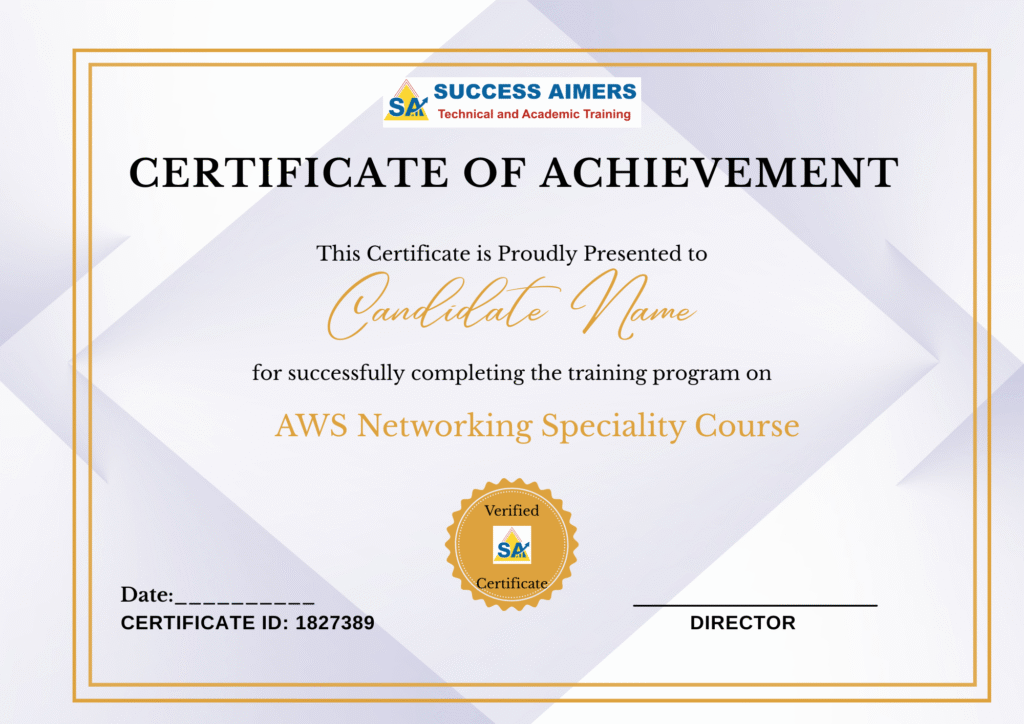
- Get your certificate upon successful completion of the course.
- Certificates for each course
- AWS VPC
- AWS EC2
- AWS Firewall Manager
- Amazon Inspector
- AWS S3
- AWS Lambda
- Amazon Cloudwatch
- AWS Event Bridge
- AWS SQS
- AWS SNS
- AWS Service Catalog
- AWS Grafana
- Dynamo DB
- App Runner

45% - 100%







Designed to provide guidance on current interview practices, personality development, soft skills enhancement, and HR-related questions

Receive expert assistance from our placement team to craft your resume and optimize your Job Profile. Learn effective strategies to capture the attention of HR professionals and maximize your chances of getting shortlisted.

Engage in mock interview sessions led by our industry experts to receive continuous, detailed feedback along with a customized improvement plan. Our dedicated support will help refine your skills until your desired job in the industry.

Join interactive sessions with industry professionals to understand the key skills companies seek. Practice solving interview question worksheets designed to improve your readiness and boost your chances of success in interviews

Build meaningful relationships with key decision-makers and open doors to exciting job prospects in Product and Service based partner

Your path to job placement starts immediately after you finish the course with guaranteed interview calls
Why should you choose to pursue a AWS Certified Advanced Networking Specialty (ANS-C01) course with Success Aimers?
Success Aimers teaching strategy follow a methodology where in we believe in realtime job scenarios that covers industry use-cases & this will help in building the carrer in the field of AWS & also delivers training with help of leading industry experts that helps students to confidently answers questions confidently & excel projects as well while working in a real-world
What is the time frame to become competent as a AWS Engineer?
To become a successful AWS Engineer required 1-2 years of consistent learning with dedicated 3-4 hours on daily basis.
But with Success Aimers with the help of leading industry experts & specialized trainers you able to achieve that degree of mastery in 6 months or one year or so and it’s because our curriculum & labs we had formed with hands-on projects.
Will skipping a session prevent me from completing the course?
Missing a live session doesn’t impact your training because we have the live recorded session that’s students can refer later.
What industries lead in AWS implementation?
Manufacturing
Financial Services
Healthcare
E-commerce
Telecommunications
BFSI (Banking, Finance & Insurance)
“Travel Industry
Does Success Aimers offer corporate training solutions?
At Success Aimers, we have tied up with 500 + Corporate Partners to support their talent development through online training. Our corporate training programme delivers training based on industry use-cases & focused on ever-evolving tech space.
How is the Success Aimers AWS Certified Advanced Networking Specialty ANS-C01 Course reviewed by learners?
Our AWS Cloud Engineer Course features a well-designed curriculum frameworks focused on delivering training based on industry needs & aligned on ever-changing evolving needs of today’s workforce due to Cloud Computing (AWS)
Also our training curriculum has been reviewed by alumi & praises the thorough content & real along practical use-cases that we covered during the training. Our program helps working professionals to upgrade their skills & help them grow further in their roles…
Can I attend a demo session before I enroll?
Yes, we offer one-to-one discussion before the training and also schedule one demo session to have a gist of trainer teaching style & also the students have questions around training
programme placements & job growth after training completion.
What batch size do you consider for the course?
On an average we keep 5-10 students in a batch to have a interactive session & this way trainer can focus on each individual instead of having a large group
Do you offer learning content as part of the program?
Students are provided with training content wherein the trainer share the Code Snippets, PPT Materials along with recordings of all the batches
AWS Cloud Certification Training Program in Gurgaon Master AWS Cloud and get prepared for AWS...
AWS Cloud Practitioner Certification Training in Gurgaon Master AWS Cloud and get prepared for AWS...
AWS Data Engineer Certification Training in Gurgaon Master AWS Cloud and get prepared for AWS...
AWS Developer Certification Training in Gurgaon Master AWS Cloud and get prepared for AWS official...
AWS Devops Certification Training in Gurgaon Master AWS Cloud and get prepared for AWS official...
AWS Machine Learning Certification Training in Gurgaon Master AWS Cloud and get prepared for AWS...
AWS Security Certification Training in Gurgaon Master AWS Cloud and get prepared for AWS official...
AWS Solution Architect Certification Training in Gurgaon Master AWS Cloud and get prepared for AWS...
AWS Sysops Administrator Certification Training in Gurgaon Master AWS Cloud and get prepared for AWS...