Microsoft Fabric Data Engineer Certification Course in Gurgaon
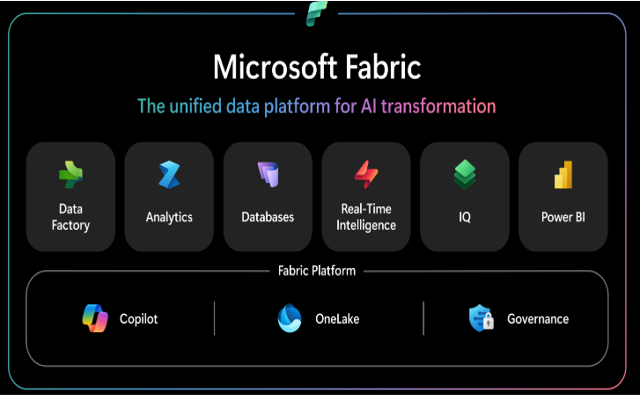
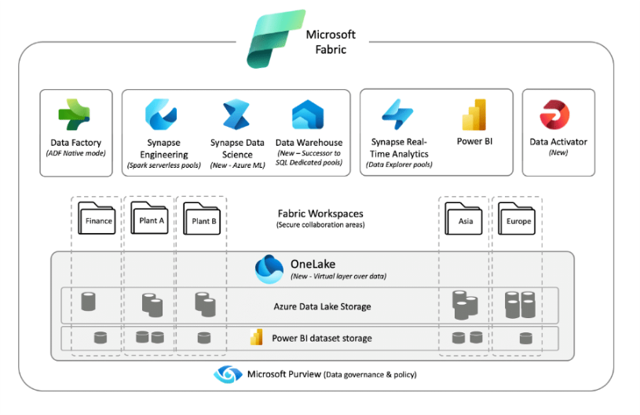
Microsoft Fabric is a unified cloud-based platform from Microsoft that unified ETL, Reporting & Analytics at one single platform. It combines Data warehousing, ETL Processing capability using Spark Engine along with Data Integration (ETL/ELT) & Power BI integration into one single environment to bring end-to-end (E2E) Data solution from Data ingestion to hydration to transformation to report along with integrated Fabric Data Governance using Serverless Spark & Dedicated SQL pool. Fabric provide single workspace in form Fabric Studio for all Data Engineers, Data Scientists & Data Analytics & also has built-in orchestration in form of Fabric Pipelines.
- Develop Data Pipelines on a single unified platform for all Data related requirements like ETL, reporting and Analytics using this single platform.
- Training program will provide interactive sessions with industry professionals
- Realtime project expereince to crack job interviews

- Course Duration - 3 months
- Get training from Industry Professionals
Train using realtime course materials using online portals & trainer experience to get a personalized teaching experience.
Active interaction in sessions guided by leading professionals from the industry
Gain professionals insights through leading industry experts across domains
24/7 Q&A support designed to address training needs
Microsoft Fabric Data Engineer Course Overview
Start your carrer in Data with Microsoft certified Fabric Data Engineer course, that will help in shaping the carrer to the current industry needs that need Data Engineers to build Data Pipelines using intelligent tools like Microsoft Fabric & others that allow organizations to boost decision making & also thrive business growth with improved customer satisfaction & bring valuable insights from the data.
- Benefit from ongoing access to all self-paced videos and archived session recordings
- Success Aimers supports you in gaining visibility among leading employers
- Industry-paced training with realtime scenarios using Microsoft Unified tools like Microsoft Fabric Analytics & others) for infrastructure automation.
- Real-World industry scenarios with projects implementation support
- Live Virtual classes heading by top industry experts alogn with project implementation
- Q&A support sessions
- Job Interview preparation & use cases
Explain Fabric Data Engineers?
Microsoft Fabric Data Engineers build ETL/Data pipelines using Fabric Analytics platform. Fabric also helps data engineers to schedule & monitor ETL workflows & manage ETL job dependencies using pipeline orchestrator. It also helps to hydrate/ingest data from various data sources using the pre-built connectors available.
Role of Fabric Data Engineer?
Fabric Data Engineers automate/build Data/ETL pipelines using Fabric platform.
Responsibilities include:
- Fabric Data engineers use Visual Studio & others IDE’s to write Spark/ETL scripts to automate/build ETL pipelines.
- Fabric Engineers manages the end-to-end Data orchestration life cycle using ETL workflows and Fabric templates.
- Develop and Design Fabric workflows that automate ETL (GLUE/PySpark/Databricks) job pipelines securely & seamlessly
- Success Aimers helps aspiring Fabric professionals to build, deploy, manage Data Pipelines using Fabric templates effectively & seamlessly.
- Deploying Fabric scripts within cloud infrastructure securely & seamlessly.
Who should opt for Fabric Data Engineer course?
Fabric Analytics course accelerates/boost career in Data & Cloud organizations.
- Fabric Engineers – Fabric Engineers manages the end-to-end Data Orchestration life cycle using Fabric workflow and connectors.
- Fabric Engineers – Implementing ETL Pipelines using Fabric Tools.
- Fabric Developers – Automated ETL pipeline deployment workflows using Fabric Tools.
- ETL/Data Architect – Leading Data initiative within enterprise.
- Data and AI Engineers – Deploying ETL Application using Azure DevOps automation tools including Fabric to orchestrate pipelines seamlessly and effectively.
Prerequisites of Fabric Data Engineer Course?
Prerequisites required for the Fabric Data Engineer Certification Course
- High School Diploma or a undergraduate degree
- Python + JSON/YAML scripting language
- IT Foundational Knowledge along with DevOps and cloud infrastructure skills
- Knowledge of Cloud Computing Platforms like AWS, AZURE and GCP will be an added advantage.
Kind of Job Placement/Offers after Fabric Data Engineer Certification Course?
Job Career Path in ETL (Cloud) Automation using Fabric Platform
- Fabric Data Engineer – Develop & Deploying ETL scripts within cloud infrastructure using Azure DevOps tools & orchestrate it by using Fabric & similar tools.
- Fabric Automation Engineer – Design, Developed and build automated ETL workflows to drive key business processes/decisions.
- Fabric Data Architect – Leading Data initiative within enterprise.
- Fabric Data Engineers – Implementing ETL Pipelines using PySpark & Fabric Tools.
- Cloud and Data Engineers – Deploying ETL Application using Azure DevOps automation tools including Fabric across environments seamlessly and effectively.
| Training Options | Weekdays (Mon-Fri) | Weekends (Sat-Sun) | Fast Track |
|---|---|---|---|
| Duration of Course | 2 months | 3 months | 15 days |
| Hours / day | 1-2 hours | 2-3 hours | 5 hours |
| Mode of Training | Offline / Online | Offline / Online | Offline / Online |
Microsoft Fabric Data Engineer Course Curriculum
Microsoft Fabric: Microsoft’s all-in-one SaaS analytics platform integrating ETL, data warehousing, Spark processing, Power BI reporting, and governance within a unified environment. Powers complete data pipelines—from ingestion through transformation to insights—using Fabric Studio workspace, serverless Spark, SQL pools, OneLake lakehouse, and native pipeline orchestration for Data Engineers, Scientists, and Analysts
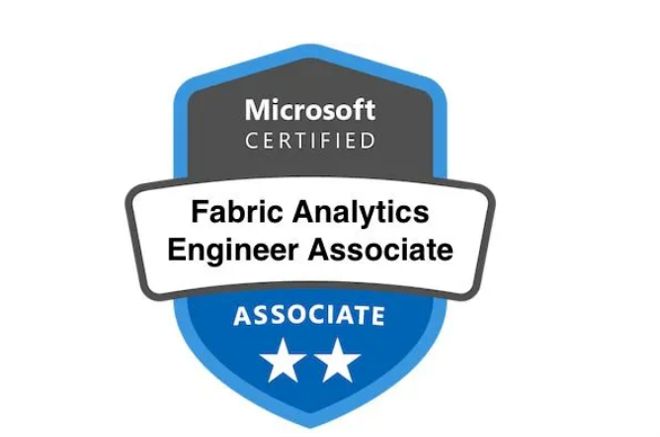
Microsoft Fabric Data Engineer Associate Certification Course
Understanding Microsoft Fabric
- Introduction
- Evolution of Data Architectures
- Delta Lake Structure
- Why Microsoft Fabric is needed
- Microsoft's definition of Fabric
- How to enable and access Microsoft Fabric
- Fabric License and costing
- Update in Fabric UI
- Experiences in Microsoft Fabric
- Update to Fabric UI - Experiences as Workloads
- Fabric Terminology
- One Lake in Fabric
- One copy for all Computes in Microsoft Fabric
Microsoft Fabric Fundamentals
- Why Microsoft Fabric?
- What is Microsoft Fabric?
- Hierarchy in Microsoft Fabric
- Roles in Microsoft Fabric
- Fabric Free Account
- Fabric Portal Overview
Microsoft OneLake – Storage Solution for Microsoft Fabric
- What is OneLake
- Why OneLake?
- Manage your data - One Lake File Explorer
Fabric Lakehouse – Store Structured, Semi Structured and Unstructured Data
- What is a Fabric Lakehouse?
- Create your first Lakehouse
- Load data to Lakehouse
- OneLake file explorer with Lakehouse
- Create tables in Lakehouse
- Parquet files with Lakehouse
- Shortcuts in Fabric
- What are Internal Shortcuts?
- What are External Shortcuts?
- Internal Shortcuts with Files
- Internal Shortcuts with Tables
- External Shortcuts Illustrations
- Caching in Shortcuts
- Lakehouse with Schema (NEW)
- Lakehouse SQL Endpoints
Fabric Lakehouse
- Understanding Fabric Workspaces
- Update in the UI of Fabric
- Enable Fabric Trail and Create workspace
- Purchasing Fabric Capacity from Azure
- Workspace roles in Microsoft Fabric
- Update in the create items UI
- Creating a Lakehouse
- What is inside Lakehouse
- Uploading data to Lakehouse
- Uploading Folder into Lakehouse
- SQL analytics endpoint in Lakehouse
- Access SQL analytics endpoint using SSMS
- Visual Query in SQL endpoint
- Default Semantic Model
- One Lake File Explorer
Fabric Data Factory
- Fabric Data Factory UI
- Ways to load data into Lakehouse
- Fabric Data Factory vs Azure Data Factory Scenario
- Gateway types in Microsoft Fabric
- Installing On-prem data gateway
- Create Connection to SQL Server
- Pipeline to ingest OnPrem SQL data to Lakehouse
- Scenario completed using Fabric data factory
- Dataflow Gen2 – Intro
- Creating Dataflow Gen2
- Dataflow Gen2 in Fabric vs Dataflows in ADF
Fabric Data Factory – Design and Build End-To-End ETL Pipelines and Workflows
- Data Ingestion in Fabric
- What is Fabric Data Factory
- Fabric Data Factory Overview
- Copy Activity in Fabric Data Factory
- Ingest data from Azure Data Lake Storage Gen 2
- Loops and Parameters in Fabric Data Factory
- Metadata Activity
- Filter Activity
- Conditional Activity - If Condition
- Deletion in Data Factory
- Variables in Fabric Data Factory
- How to send email notification on failure?
- Parent and Child Pipelines
- Triggers in Fabric Data Factory
- Monitoring in Fabric Data Factory
Transform our Data with Low/No-Code with Dataflow Gen 2
- Dataflow Gen2 overview
- Type casting in DataflowGen2
- Replace Values in DataflowGen2
- String Transformations
- Apply statistical functions
- Diagram view in DataflowGen2
- Apply Joins in DataflowGen2
- Adding a destination (Lakehouse)
- Scheduling Dataflows
- Integrating DataflowGen2 with Data Factory
Fabric OneLake
- Loading Data status
- Shortcuts in Fabric - Intro
- Prerequisites to Create a shortcut
- Creating a shortcut in Files of Lakehouse
- Criteria to create shortcuts in table section
- Uploading required files and access for synapse
- Right way to create a shortcut in table's section
- Creating Delta file
- Creating shortcut in Table's section
- Scenario - Creating shortcut with delta in a subfolder
- Scenario - Creating shortcut with only parquet format
- Requirements to create shortcuts in Table and files section
- Updation Scenario 1 - Lakehouse to Datalake
- Updation Scenario 2 - Datalake to Lakehouse
- Shortcut deletion scenarios intro
- Deletion Scenario 1 - Delete in Lakehouse files
- Deletion Scenario 2 - Delete in ADLS
- Deletion Scenario 3 - Delete table data in Lakehouse
- Deletion Scenario 4 - Delete table data in ADLS
- Deletion Scenario 5 - Deleting entire shortcut
- Shortcut deleting scenario summary
Spark Development – The Heart of Fabric Data Engineering
- First of all - Understand SPARK
- Nodes Sizes in Fabric
- Starter Pools VS Custom Pools
- Fabric Notebooks Overview
- PySpark Fundamentals
- Type Casting in PySpark
- Transform Date Columns
- Replacing Values in PySpark
- PySpark Intermediate Level Functions
- Transform time sensitive columns with Timestamp Functions
- Spark SQL - Run SQL queries in PySpark
- Data Visualization for big data analysis
- External vs Managed Tables
- NotebookUtils in PySpark (MSSparkUtils)
- Delta Lake Tables
- Time Travel in Delta Lake Tables
- OPTIMIZATION strategies in Delta lake tables
- VACUUM and Optimize Write Command
- Spark Streaming with Delta Tables
- Isolated Environments in Fabric Spark
- How to create Environments in Fabric
- Monitoring and Scheduling Spark Notebooks
- Spark Job Definition
- How to Import Notebooks from PC
Fabric Synapse Data Engineering
- Ingestion to Lakehouse status
- Spark in Microsoft Fabric
- Spark pools in Microsoft Fabric
- Spark pool node size
- Customizing Starter pools
- Creating a custom pool in Workspace
- Standard vs High Concurrency Sessions
- Changing Spark Settings to Starter Pool
- Update in attaching Lakehouse to Notebook Option
- Understanding Notebooks UI
- Fabric Notebook basics
- MSSparkUtils - Intro
- MSSparkUtils - FS- Mount
- MSSparkUtils - FS - Other utils
- MSSparkUtils - FS - FastCp
- Creating Folders in Microsoft Fabric
- MSSparkUtils - Notebook Utils - Run exit
- MSSparkUtils - Notebook - RunMultiple
- Access ADLS data to Lakehouse - Intro
- Access ADLS using Entra ID
- Access ADLS using Service principal
- Access ADLS using SP with keyvault
- Call Fabric notebook from Fabric pipeline
- Managed vs External table - Intro
- Create a Managed Table
- Create an External Table
- Shortcut Table is an external or managed table
- Data Wrangler in Fabric Notebook
- Environments in Microsoft Fabric
- Understanding V-order optimization
- Inspire us with your Thoughts
- Spark Job Definition
- What is a Data Mesh
- Creating domains in Fabric
Fabric Data Warehouse – A Lake Centric Data Warehouse for our GOLD Layer
- Data Warehouse Fundamentals
- Fabric Data Warehouse Overview
- Load data to Data Warehouse
- COPY INTO command in Fabric Data Warehouse
- CTAS - Copy Table As Select
- Gold Layer Aggregated View using T-SQL
- Gold Layer Business View using T-SQL
- T-SQL Functions
- T-SQL Stored Procedures
- Dynamic Management Views
- Query Insights Views
- Visual Query Editor in Fabric Data Warehouse
- Integrating T-SQL with Notebook
- SSMS Setup
- Access Control in Fabric Data Warehouse
- Dynamic Data Masking
- Column Level Security
- Row Level Security
- Semantic Models
- Direct Lake in Fabric
Synapse Migration to Microsoft Fabric
- Manual import from Synapse to Fabric
- Automated way to import and export notebooks - Intro
- Migrate all notebooks from Synapse to Fabric
- Possibility of Migration of Pipelines to Fabric pipelines
- Ways to migrate ADLS data to Fabric OneLake
- Migrate ADLS data to OneLake using Storage Explorer
Fabric Capacity Metrics App
- Install Capacity Metrics App
- Understanding UI of Capacity Metrics App
- Capacity Units consumption
- Throttling vs Smoothing
- Throttling stage- Overage Protection Policy
- Other throttling stages
- Throttling stages Summary
- Overages in Fabric
- System Events in Fabric
- Matrix Visual
Fabric Synapse Data Warehouse
- Creating a Warehouse in Fabric
- Warehouse vs SQL Analytics Endpoint
- Creating a table and Limitations
- Ways to Load Data into Warehouse
- Loading Data using COPY INTO Command
- Loading Data using Pipeline to Warehouse
- Loading Data using Dataflow Gen2
- Data Sharing - Lakehouse & Warehouse
- Cross Database Ingestion in Warehouse
- Lakehouse vs Warehouse when to choose what
- Different Medallion Architectural patterns
- Update Lakehouse data from WH and vice versa
- SQL query as session in Fabric
- Zero Copy clone within and across Schema
- Time Travel in Warehouse
- Benefits & Limitations of Zero Copy clones
- Cloning single or multiple tables using UI
- Query Insights in Warehouse
Fabric Data Governance
- Why Fabric Access Control
- Workspace Level Access Control
- Item Level Access Control
- One Lake Level Access Control
- Data Lineage
- Endorsements
- Monitoring in Fabric
- Fabric Admin Access
- Fabric Connections and Gateways
- Fabric Capacity Metric App
Fabric Access Control and Permissions
- Microsoft Fabric Structure
- Tenant Level permissions
- Capacity Level Permissions
- Creating new user in Entra ID
- Workspace roles- Workspace Administration
- Workspace roles - Data pipeline permissions
- Workspace Roles - Notebook, Spark jobs, etc
- Data Warehouse permissions - Intro
- Workspace Roles - Accessing shortcuts internal to fabric - Theory
- Workspace Roles - Accessing Shortcuts Internal to Fabric - Practical
- Workspace Roles - Accessing ADLS shortcuts - Theory
- Workspace Roles - Accessing ADLS shortcuts - Practical
- Workspace Roles - Lakehouse permission
- Item level permissions - Intro
- Warehouse Sharing - No additional permissions
- Warehouse Sharing - Read Data permissions
- Warehouse Sharing - Read All permissions
- Warehouse Sharing - Build permissions
- Extend Microsoft Fabric Trail
- Lakehouse Sharing - All permissions
- Notebook - Item Sharing
- Manage OneLake data access
- Row-Level Security in Warehouse and SQL endpoint
- Dynamic Data Masking in Warehouse and SQL endpoint
- Column & Object level security in Warehouse and SQL endpoint
Real Time Analytics – Eventstream, Eventhouse, KSQL DB (Real-Time Analytics in Microsoft Fabric)
- What is Real Time Analytics?
- Tumbling Windows
- Hopping Windows
- Sliding Windows
- Session Windows
- Snapshot Windows
- Eventstream in Fabric
- Transforming Real Time Data
- Eventhouse and KQL DB
- Kusto Query Language (KQL) Overview
- KQL Basics
- Filtering and Date Functions
- Aggregation Functions in KQL
- Materialized Views in KQL
- Functions in KQL
- Real Time Dashboards
- Base Queries for Real Time Dashboards
- Fabric Activator
Microsoft Power BI in Fabric (Direct Lake & Power BI)
- Default Semantic Model - Intro
- Manage default Semantic Model
- Accessing Lakehouse or Warehouse using Power BI Desktop
- Automatically update semantic model in Lakehouse or warehouse
- Creating new Semantic Model
- Lineage view and Impact Analysis
- Connect using XMLA endpoint and read write using Tabular Editor
- What is a Direct Lake
- Direct Lake - Practical
- Direct Lake vs Direct Query vs Import modes
- Refresh a Semantic Model - Manual
- Refresh Semantic model from Notebook
- Refresh Semantic Model from XMLA Endpoint
- Refresh Semantic Model from Data Pipeline
- Fallback to Direct Query Scenarios
- Handling Fallback behavior of Semantic Models
- Copy Multiple measures from One Model to another in Fabric.mp4
- Row-level security in Power BI
- Row-level security without Viewer Role
- Build permission to user with RLS
- Dynamic Row-level Security
- Object level Security with viewer role
- Object level security without Viewer role
- Column level security
Data Science in Microsoft Fabric
- Data Science in Microsoft Fabric
- Notebooks
- Experiments
- Models
- Preparing Data - Data Wrangling
- End-to-End Project: Getting Set Up
- End-to-End Project: Ingesting Data
- End-to-End Project: Exploring the Data Part 1
- End-to-End Project: Exploring the Data Part 2
- End-to-End Project: Exploring the Data Part 3
- End-to-End Project: Exploring the Data Part 4
- End-to-End Project: Train and Evaluate the Data Part 1
- End-to-End Project: Train and Evaluate the Data Part 2
- End-to-End Project: Train and Evaluate the Data Part 3
- End-to-End Project: Train and Evaluate the Data Part 4
- End-to-End Project: Reporting Part 1
- End-to-End Project: Reporting Part 2
Fabric End to End Project
- Different Medallion architectures in Fabric
- Understanding domain and dataset information
- Project Architecture
- Creating workspace for project and review dataset
- Get data from Raw to landing - theory
- Raw to Landing Zone
- Different incremental loading patterns
- Incrementally ingest from Raw to landing zone
- Automate ingest from Raw to Landing using pipeline
- Ingest data from Landing to Bronze layer - Theory
- Understanding UPSERT logic for Landing to Bronze ingestion
- Landing to Bronze layer - practical
- Reading landing to bronze from next partition
- UPSERT scenario practical - Landing to bronze
- Bronze layer to silver layer - Theory
- Understanding data transformations and UPSERT logic for silver table
- Silver table - Data cleaning
- Silver Layer - Data Transformations
- Gold Layer - Facts and dimensions table - Theory
- Gold Layer - Facts and dimension tables - Practical
- Data modelling and creating a report
- Orchestrate end to end pipeline and execute it
Fabric Git Integration
- Creating data sources for PROD
- Changes made to support Git integration
- Executing to check if changes were working
- Sign up with Azure DevOps account
- Connect Fabric workspace to Azure DevOps
- Git integration permissions and Limitations
- Locking main branch with branch policy
- Understanding Continuous Integration (CI) in Fabric
- Continuous Integration in Fabric Workspace
- Status of workspace created for feature branch
- Understanding Continuous Deployment in Fabric
- Deploying Fabric items from Dev to Prod
- Deployment rules to Change data sources of Prod workspace
- End to End execution in PROD
- Git integration for Power BI developers
- Summary of version control for Power BI
Fabric Data Agent
- What is Fabric Data Agent
- How Fabric Data Agent works
- Pre-requisites for Data Agent
- Associate Fabric Capacity to Workspace
- Create and configure Fabric Data Agent
- Fabric Data Agent sharing
E-Commerce Project – ADLS + Data Pipelines + PySpark + Power BI
- PROJECT INTRODUCTION
- PROJECT SETUP & SOURCE SETUP
- FABRIC WORKSPACE & LAKEHOUSE
- DATA PIPELINE - ADLS TO LAKEHOUSE COPY
- DATA CLEANING & REPORTING - PYSPARK + POWER BI
MEDALLION ARCHITECTURE : END TO END PROJECTS
- PROJECT INTRODUCTION
- DATA PIPELIENE - ADLS TO LAKEHOUSE
- DATA CLEANING & REPORTING- PYSPARK & POWER BI
DATA MIGRATION PROJECT: END TO END DATA PIPELINE
- PROJECT INTRODUCTION
- BUSINESS USE CASE & PROBLE
- PRACTICAL - END TO END DATA PIPELINE
E-Commerce Order Analytics Project – Spark SQL + DATA PIPELINE + Power BI
- PROJECT INTRODUCTION
- PROJECT PRACTICAL - DATA PIPELINE + LAKEHOUSE + SPARK SQL
- POWER BI & REPORTING
HR ANALYTIC Project – DATA FLOW GEN2 + DATA PIPELINE + Power BI
- PROJECT INTRODUCTION & BUSINESS USE CASE
- PROJECT PRACTICAL - DATA PIPELIEN + LAKEHOUSE + DATA FLOW GEN2 + POWER BI
INCREMENTAL DATA LOAD – END TO END PIPELINE
- PROJECT INTRODUCTION & BUSINESS USE CASE
- END TO END DATA PIPELINE
INSURANCE PROJECTS – DATA PIPELINE + LAKEHOUSE + PYSPARK + REPORTING
- PROJECT INTRODUCTION & BUSINESS USE CASE
- PROJECT PRACTICAL - ADLS + LAKEHOUSE+ PYSPARK + REPORTING
RETAIL DATA ENGINEERING PROJECTS
- PROJECT INTRODUCTION
- PROJECTS PRACTICAL - DATA PIPELINE + PYSPARK + LAKEHOUSE + REPORTING
SCD TYPE -1 DATA PIPELINE PROJECT
- PROJECT INTRODUCTION
- PROJECTS PRACTICAL - DATA PIPELINE + PYSPARK + LAKEHOUSE + REPORTING
SCD TYPE -2 DATA PIPELINE PROJECT
- PROJECT INTRODUCTION
- DATASET UNDERSTANDING – SCD TYPE-2
Develop a Data Pipeline using Fabric Analytics to ingest data from hybrid sources (API, HTTP interfaces, databases & others) into DW’s & Delta Lake) & orchestrate/schedule it by using Fabric Pipelines.
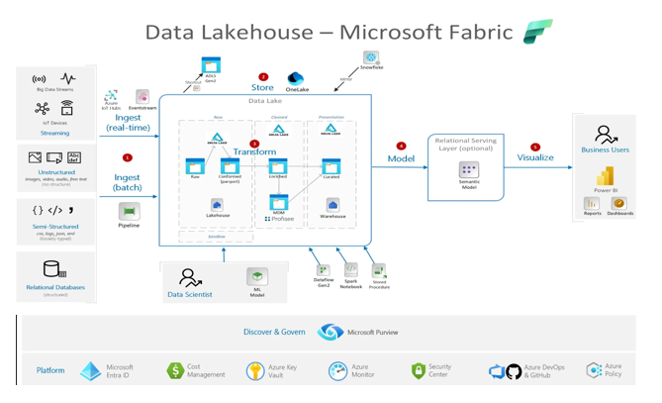
Project Description : Data will be hydrated from various sources into the raw layer (Bronze Layer) using Fabric Data Factory connectors. Further it will be processed through silver layer/table after data standardization & cleansing process. From curated layer (silver layer) DataBricks jobs populate the target layer (gold layer) after business transformation that will derive key business insights. The whole pipeline will be automated by using ETL orchestration tool Airflow.
Project 2
Build ETL/ Data Ingestion Pipeline using Microsoft Fabric Analytics Platform
The Data pipeline will be automated through Microsoft Fabric Pipelines that will triggers Databricks Jobs that will perform the business validation using Spark jobs & ingest it into Delta Tables within the Data Pipeline that is being build using Medallion Architecture. Microsoft Fabric Pipelines is build by using components like Fabric Lakehouse, Fabric Data Factory, Fabric OneLake, Fabric Synapse Data Engineering, Fabric Synapse Data Warehouse used for performing Data Analysis & build Data Pipelines using Fabric Data Factory.
Hours of content
Live Sessions
Software Tools

After completion of this training program you will be able to launch your carrer in the world of Fabric being certified as Microsoft Certified Fabric Data Engineer.
With the Fabric Certification in-hand you can boost your profile on Linked, Meta, Twitter & other platform to boost your visibility
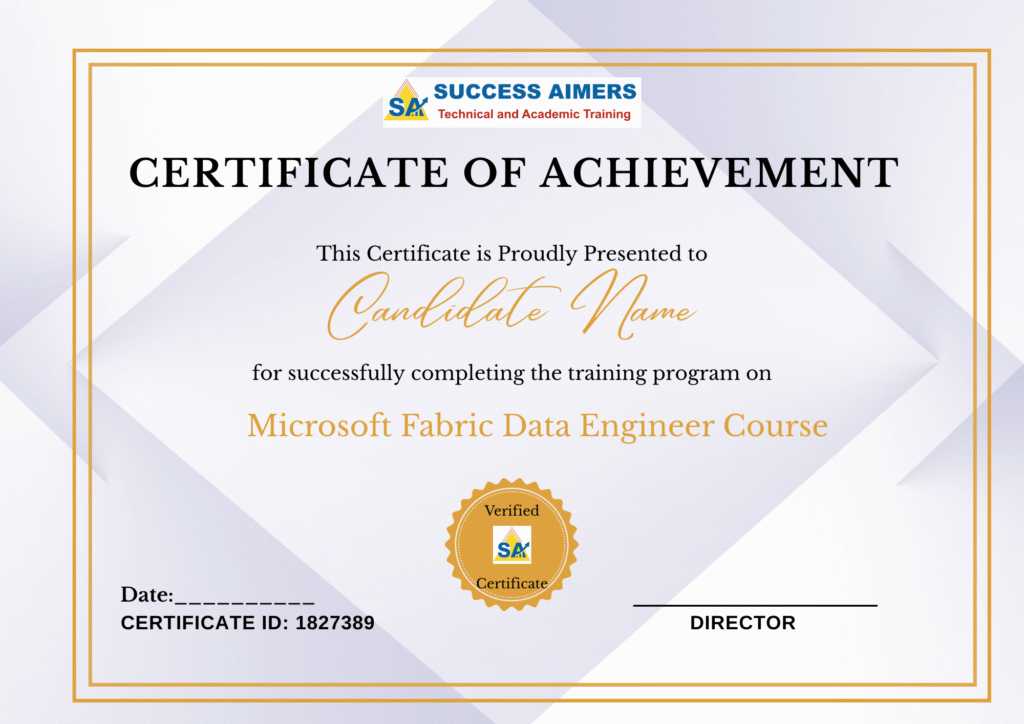
- Get your certificate upon successful completion of the course.
- Certificates for each course
- Data Factory
- Synapse
- Power BI
- PySpark
- Azure DevOps
- Fabric
- ADLS
- Azure Container Registry
- Jenkins
- Ansible
- Git
- Kubernetes
- Terraform Cloud
- Docker

50% - 80%







Designed to provide guidance on current interview practices, personality development, soft skills enhancement, and HR-related questions

Receive expert assistance from our placement team to craft your resume and optimize your Job Profile. Learn effective strategies to capture the attention of HR professionals and maximize your chances of getting shortlisted.

Engage in mock interview sessions led by our industry experts to receive continuous, detailed feedback along with a customized improvement plan. Our dedicated support will help refine your skills until your desired job in the industry.

Join interactive sessions with industry professionals to understand the key skills companies seek. Practice solving interview question worksheets designed to improve your readiness and boost your chances of success in interviews

Build meaningful relationships with key decision-makers and open doors to exciting job prospects in Product and Service based partner

Your path to job placement starts immediately after you finish the course with guaranteed interview calls
Why should you choose to pursue a Fabric Data Engineer course with Success Aimers?
Success Aimers teaching strategy follow a methodology where in we believe in realtime job scenarios that covers industry use-cases & this will help in building the carrer in the field of ETL/Data Pipelines Orchestration (Fabric Pipelines) & also delivers training with help of leading industry experts that helps students to confidently answers questions confidently & excel projects as well while working in a real-world
What is the time frame to become competent as a Fabric Analytics Platform engineer?
To become a successful Fabric Data Engineer required 1-2 years of consistent learning with dedicated 3-4 hours on daily basis.
But with Success Aimers with the help of leading industry experts & specialized trainers you able to achieve that degree of mastery in 6 months or one year or so and it’s because our curriculum & labs we had formed with hands-on projects.
Will skipping a session prevent me from completing the course?
Missing a live session doesn’t impact your training because we have the live recorded session that’s students can refer later.
What industries lead in Fabric implementation?
Manufacturing
Financial Services
Healthcare
E-commerce
Telecommunications
BFSI (Banking, Finance & Insurance)
“Travel Industry
Does Success Aimers offer corporate training solutions?
At Success Aimers, we have tied up with 500 + Corporate Partners to support their talent development through online training. Our corporate training programme delivers training based on industry use-cases & focused on ever-evolving tech space.
How is the Success Aimers Fabric Data Engineer Certification Course reviewed by learners?
Our Fabric Data Engineer Course features a well-designed curriculum frameworks focused on delivering training based on industry needs & aligned on ever-changing evolving needs of today’s workforce due to Data and AI. Also our training curriculum has been reviewed by alumi & praises the through content & real along practical use-cases that we covered during the training. Our program helps working professionals to upgrade their skills & help them grow further in their roles…
Can I attend a demo session before I enroll?
Yes, we offer one-to-one discussion before the training and also schedule one demo session to have a gist of trainer teaching style & also the students have questions around training programme placements & job growth after training completion.
What batch size do you consider for the course?
On an average we keep 5-10 students in a batch to have a interactive session & this way trainer can focus on each individual instead of having a large group
Do you offer learning content as part of the program?
Students are provided with training content wherein the trainer share the Code Snippets, PPT Materials along with recordings of all the batches
Apache Airflow Training Course in Gurgaon Orchestrating ETL pipelines using Apache Airflow for scheduling and...

AWS Glue Lambda Training Course in Gurgaon AWS GLUE is a Serverless cloud-based ETL service...
Azure Data Factory Certification Training Course in Gurgaon Orchestrating ETL pipelines using Azure Data Factory...
Azure Synapse Certification Training Course in Gurgaon Azure Synapse Analytics is a unified cloud-based platform...

Big Data Certification Training Course in Gurgaon Build & automate Big Data Pipelines using Sqoop,...

Kafka Certification Training Course in Gurgaon Build realtime data pipelines using kafka using Kafka API’s...

PySpark Certification Training Course in Gurgaon PySpark is a data processing tool that is used...