Azure Open AI & Azure AI Foundry Training Course
AI is the future innovation with Agentic AI tools and frameworks (n8n, Auto-Gen, ChatGPT, Azure Open AI & Azure AI Foundry ) for intelligent automation. We are delivering this training in Gurgaon where-in core Gen AI principles using patterns like multi-agents, reflection & others will be taught using hands-on training to become a Gen AI Engineer.
- Get mastery in building Agentic AI workflows for intelligent automation & to drive key businesses powered through agentic ai frameworks like n8n,Auto GPT, ChatGPT & others.
- Experience blended learning through interactive offline and online sessions.
- Job Oriented Training Course

- Course Duration - 3 months
- Get Trained from Industry Experts
Train using realtime course materials using online portals & trainer experience to get a personalized teaching experience.
Trained through leading industry professionals to get realtime project exposure
Gain professionals insights through leading industry experts across domains
24/7 Q&A support designed to address training needs
Azure Open AI & Azure AI Foundry Course
Kickstart your carrer in AI with certification in Generative AI with Azure Open AI & Azure AI Foundry Engineer course, that will help in shaping the carrer to the current industry needs that need automation using intelligent workflows like n8n, Microsoft AutoGen, LangGraph, Vector DB & others in every domain & sphere of the industry that will allow organizations to boost decision making & also thrive business growth with improved customer satisfaction.
- Self-paced videos & training materials with archived session recordings
- Success Aimers targets industry employers to gain visibility
- Industry-paced training with realtime scenarios using Agentic AI frameworks/tools (n8n, Microsoft AutoGen, Langchain, LangGraph, AWS Bedrock, Azure Open AI & Azure AI Foundry) for intelligent automation.
- Real-World industry scenarios with projects implementation support
- Live Virtual classes heading by top industry experts alogn with project implementation
- Q&A support sessions
- Job Interview preparation & use cases
Explain Azure Open AI Engineer?
AI Engineers automate business processes via AI development frameworks (Agentic AI) like Azure AI Foundry, Azure Open AI, n8n, Microsoft AutoGen, Langchain, LangGraph, AWS Bedrock, Azure Open AI & others for intelligent automation that will allow organizations to boost decsion making & also thrive business growth with improved customer satisfaction. AI engineers build optimized workflows, deployment & maintain the AI development lifecycle to deliver high-précised solutions to the clients using Agentic AI frameworks/workflow builders.
Role of Azure Open AI Engineer?
Azure Open AI Engineers manages the end-to-end AI development lifecycle using Agentic AI frameworks and intelligent workflow strategies.
Responsibilities include:
- Agentic AI Tools Adoption & automation using patterns like RAG ,Tools ,Reflection & others
- Continuously exploring new AI based frameworks/tools to build optimized workflows
- Deploying AI model within cloud infrastructure securly & seamlessly.
- Develop & Design AI workflows that meets business needs with automation scripts
- Success Aimers helps aspiring AI professionals to build, deploy, manage these Agents effectively seamlessly & to scale as per business needs.
Who should opt for Azure Open AI Engineer course?
Gen AI course accelerates/boost carrier in AI & technology-driven organizations
- AI & Application Engineers – Develop Agentic AI workflows to automate business processes.
- Data Engineers – Implementing Data Pipelines using AI
- AI Developers – Automated workflows using Agentic AI frameworks/tools
- AI Leaders – Leading AI Governance & initiative within enterprise.
- Cloud & Infrastructure Engineers – Deploying AI developed applications seamlessly & effectively.
Prerequisites of Azure Open AI Engineer Course?
Prerequisites required for the Generative AI Engineer Certification Course
- Below is the prerequisite to become a successful AI Professional:
- High School Diploma or a undergraduate degree
- Python Programming language
- IT Foundational Knowledge along wit Data Science & Software Development skills
- Knowledge of Cloud Computing Platforms like AWS, AZURE & GCP will be an added advantage.
Kind of Job Placement/Offers after Azure Open AI Engineer Certification Course?
- Job Carrer Path in Azure Open AI & N8N Automation
- Azure Open AI Engineer – Develop & Deploy AI developed solutions/applications using agentic frameworks/tools
- Azure Open AI Engineer – Build context-aware, Enterprise ready AI systems.
- AI Automation Engineer – Design, Developed & build automated workflows to drive key business processes/decisions
- Cloud AI Engineer / AI Cloud Architect – Deploy AI Solutions seamlessly & effectively across enterprises with AI Governance strategy
- AI Model Deployment Engineer – Automate Model Deployment & AI Lifecycle management via MLOps pipeline & Agentic AI Frameworks
| Training Options | Weekdays (Mon-Fri) | Weekends (Sat-Sun) | Fast Track |
|---|---|---|---|
| Duration of Course | 2 months | 3 months | 15 days |
| Hours / day | 1-2 hours | 2-3 hours | 5 hours |
| Mode of Training | Offline / Online | Offline / Online | Offline / Online |
Azure Open AI Engineer Certification Course Curriculum
Start your carrer in AI with certification in Azure Open AI Engineer course, that will help in shaping the carrer to the current industry needs that need automation using intelligent workflows like Azure Open AI, Azure AI Foundry, n8n, Microsoft AutoGen, LangGraph & others in every domain & sphere of the industry that will allow organizations to boost decision making & also thrive business growth with improved customer satisfaction.
Azure AI Foundry
Course Details - Azure AI Foundry
Intro to AI Agents
- Introduction to AI Agents
- What are AI Agents?
- How an AI Agent Works ?
Azure AI Foundry Basics
- Introduction to Azure AI Foundry
- What is Azure AI Foundry?
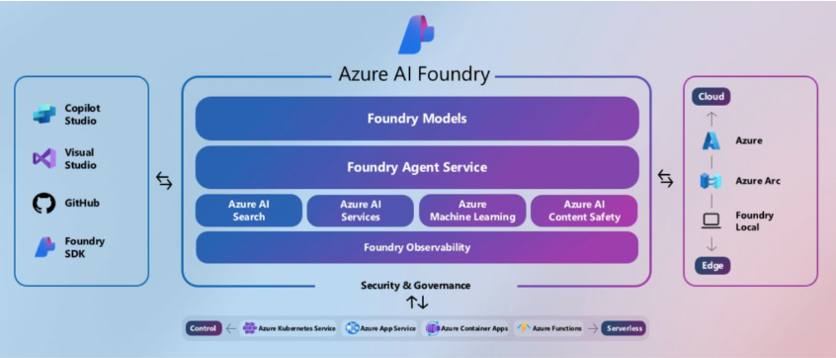
- Architecture of Azure AI Foundry
- Projects vs Hubs
- How It Differs from Azure OpenAI Service
- Navigating the Azure AI Foundry Portal
- Model Benchmarks
- Access Playgrounds via Foundry
- Management Centre
Assistants API – A Refresher
- Advice
- Introduction to Assistants API
- What is Assistants API ?
- Assistants API Component / Key Terms
- Assistants API Architecture
- What is Function Calling ?
- Demo: FC: Python Code : Function Calling Intro
- Demo: FC: Python Code: Get an API Key from openweathermap.org
- Pre-Req Setup azureopenai.env
- Demo: FC : Python Code : Initialise and Set the Environment
- Demo: FC : Python Code : Instantiate the Client Object of Azure OpenAI
- Demo:FC : Python Code: Define the get_weather Function
- Demo: FC: Python Code: Define the tools list required for the Assistants API
- Demo: FC_ Python Code : Create an Assistant & Thread
- Demo: FC:Python Code: Create a function for running the conversation
- Demo: FC: Python Code: Take the User input and show result
Azure AI Agent Service
- Intro to Azure AI Agent Service
- What is Azure AI Agent Service?
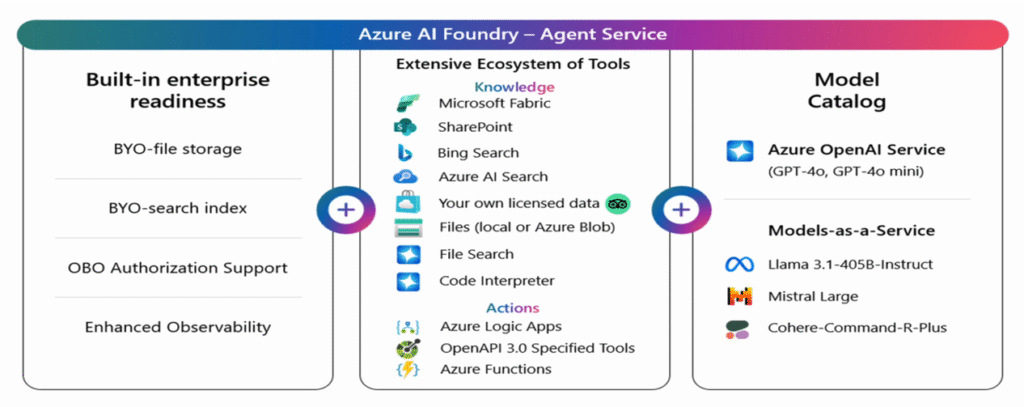
- Architecture of Azure AI Agent Service
- Assistants API Vs Azure AI Agent Service
- Model & Region Support
- Quotas & Limits
- Azure AI Agent Service Pricing
- Demo: Create a Hub & Project
- Demo: Create an Agent via Azure Foundry
- Demo: Understand the various Knowledge & Action Tools
- Demo : Get a Response to your prompt via the Agents
Understanding Azure SDK for Python
- Introduction to Azure SDK for Python
- What is Azure AI Projects client library for Python
- Demo: Create VSCode Environment & setup Azure-CLI
- Understand the Workflow for Agent Creation
- Demo: Create Azure AI Project via Azure AI Foundry
- Demo: Create Entra ID Application & Grant Contributor access
Azure AI Agent Service Action Tools – Function Calling
- Action Tools - Function Calling
- Intro to Function Calling
- Demo: Create a new Deployment inside Project
- Demo: Understand the Workflow for Weather Agent
- Demo : Understand the Environment Variables
- Demo : Install Libraries and Setup Environment
- Demo: Understand the Get_weather Function
- Demo: Calling your Azure AI Agent
Azure AI Agent Service Action Tools – Code Interpreter
- Title - Code Interpreter
- Intro to Code Interpreter
- What is Code Interpreter ?
- Understand the Input Data - sales_data.csv
- Demo: How to use CI in Agents Playground
- Demo: Understand the Workflow for Graph Generator Agent
- Demo: Upload the sales_data.csv & Environment variables file
- Demo: Understand the Creation of Agent
- Demo: Create Thread and Message Conversation
- Demo: Run the Agent & Create Graphs
Azure AI Agent Service Action Tools – Open API 3.0
- Title - Open API 3.0
- What is Open API 3.0 ?
- Understanding the Workflow for Yahoo Finance
- Demo: Create Rapid API Key
- Demo: Create a Connection to Rapid API in Azure
- Demo: Create a Stocks Agent and Attach Open API 3.0
- Demo: Test the Stocks Agent in Playground
- Demo: Install the Libraries and Setup Environment
- Authenticate/Initialize/ Load Open API Spec
- Get Connection / Create Auth Object / Create Open API Tool
- Create Agent / Thread / Conversation Loop
- Execute the Program and run Queries
Azure AI Agent Service Knowledge Tools – Bing Search
- Title - Knowledge Tools - Bing Search
- Intro to Grounding with Bing Search
- What is Grounding with Bing Search ?
- Demo : Create a Bing Search with Agent Service
- Demo: Create a Bing Resource & Create Connection
- Demo: Setup environment & install libraries
- Demo: Understand the Code
- Demo: Execute the Code
- Title - Open API 3.0
- What is Open API 3.0 ?
- Understanding the Workflow for Yahoo Finance
- Demo: Create Rapid API Key
- Demo: Create a Connection to Rapid API in Azure
- Demo: Create a Stocks Agent and Attach Open API 3.0
- Demo: Test the Stocks Agent in Playground
- Demo: Install the Libraries and Setup Environment
- Authenticate/Initialize/ Load Open API Spec
- Get Connection / Create Auth Object / Create Open API Tool
- Create Agent / Thread / Conversation Loop
- Execute the Program and run Queries
Azure AI Agent Service Knowledge Tools – File Search
- Title - Knowledge Tools - File Search
- Intro to File Search
- File Search ?
- Demo: Utilize File Search with AI Foundry
- Demo: Understand the workflow
- Demo: Install Libraries & Setup Environment
- Demo: Initialise the Project Client & Upload the File
- Demo: Create Vector Store / Agent
- Demo: Create Thread and Process Messages
- Demo: Run the Code and ask Questions
Azure AI Agent Service Knowledge Tools – Azure AI Search
- Title - Knowledge Tools - Azure AI Search
- Intro Azure AI Search
- What is Azure AI Search ?
- Understand the Workflow
- Demo: Create a Storage Account & Upload Document
- Demo: Ensure / Create you have Azure OpenAI Service
- Demo: Create Embeddings Deployment
- Demo: Create Azure AI Search Resource
- Demo: Create an Index
- Demo: Create an Agent & Attach the Knowledge Tool
- Demo: Run Queries in Agents Playground
- Demo: How to use AI Search in Python Code
- Demo: Install Libraries and Setup Environment
- Demo: Initialise the Project Client
- Demo: Create Agent
- Demo: Execute the Code
Real World Scenario – Freshdesk Agent
- Title - Freshdesk Agent
- Understand the Workflow and what we shall Build
- Create a login on Freshdesk & Setup API Key
- Install Binaries & Setup Environment
- Understand the Custom Function create_freshdesk_ticket
- Initialize Azure AI / Create toolset
- Create the Freshdesk Agent
- Execute the Program and Check the Tickets
Azure AI Foundry Agent Service (Post GA)
- Azure AI Foundry Agent Service (Post GA)
- Agent Service in GA Mode
- Importance of AI Foundry Project
- Demo: Create Azure AI Foundry Project
- Demo: Create an Agent using Foundry
- Azure AI Projects client library for Python b11 Changes
- Demo: Create VSCode Environment & Understand Code
- Demo: Execute a Simple Code
Azure AI Agent Knowledge Tools - Tripadvisor
- Title- Knowledge Tools - Tripadvisor
- What is Tripadvisor & Microsoft Partnership
- Demo: Create a Connection
- Demo : Create Your Tripadvisor Agent
- Demo: Execute Prompts against the Agent
- Demo: Look into the pre-reqs for the code
- Demo: Install Packages and Import Libraries
- Demo: Load Environment Variables
- Authenticate AI Client & Load Open API Schema
- Create open API Tool & Agent
- Demo: Create Thread & Handle Conversations
- Demo: Execute the Program
Azure AI Agent Service Action Tools – Azure Logic Apps
- Title - Azure Logic Apps
- What is Azure Logic Apps ?
- Demo: Create a Simple Agent and Try Send an Email
- Demo: Add Logic App Action
- Demo: Test the Agent in the Agents Playground
- Title - Coding Send an Email with Logic Apps
- Demo: Install / Import Libraries & Set Env
- Demo: Understand Send Email Function
- Demo: Create Agent
- Demo: Process Conversation with Tool Calling
- Demo: Understanding the main function
- Demo: Execute the Program
Working with the Semantic Kernel SDK (Multi-Agentic Systems)
- Introduction to Building Agentic Workflows with Semantic Kernel SDK
- What is Semantic Kernel ?
- Architecture of Kernel
- Understanding Plugins in Semantic Kernel SDK
- Various Orchestration Frameworks in Semantic Kernel
- Demo: Setup the Project in VS Code
- Demo: Import Dependencies & Load Env Variables
- Demo: Understand the Functions Defined
- Demo: Understand the role of each Agent
- Demo: Define Function run_business_post_example
- Demo: Understand the main block
- Demo: Execute the Agents
- Understanding Prompt Template Plugins
- Understanding Native Plugins
- Architecture for Building a Multi-Agent System
- Lab: Building a Multi-Agent System (Hands-On)
Mastering MCP : Beginner to Pro Access the AI Ecosystem
- MCP Across AI Frameworks & Platforms : Langchain, LllamaIndex, Open AI SDK, Google ADK
- Detailed breakdown of MCP
- Claude Desktop and GitHub Copilot on VSCode Installation
- Lab 1: Running GitHub MCP Server (Hands-On Demo)
- Lab 2: Creating a Weather MCP Server (Hands-On Demo)
- Lab 3: Creating an Azure AI Agent Service MCP Server (Hands-On Demo)
Building a Bling Web Searcher Agent
- Lab: Deploying a Bing Grounding Resource (Hands-On Lab)
- Lab: Building our Agent with the SDK (Hands-On Lab)
Building a RAG Agent
- The What, Why and How of RAG
- What Are Vector Embeddings?
- Lab: Working with Vector Embedding engine (Hands-On Lab)
- Vector Search With Azure Cognitive Search Theory
- RAG Agent Architecture
- Lab: Creating Our Azure AI Search Index for RAG (Hands-On
- Lab: Bringing our RAG agent to life with the SDK (Hands-On Lab)
Semantic Kernel Agent Framework
- Introduction to the Semantic Kernel Agent Framework
- Lab: Getting Started and creating a "Chat Completions Agent" (Hands-On Lab)
- Lab: Creating an "Azure AI Agent" (Hands-On Lab)
- Lab: Agent with Native and Prompt Template Plugins (Hands-On Lab)
- Lab: Azure AI Agent with Multiple Plugins (Hands-On Lab)
- Lab: Agent Group Chat with Azure AI Agents (Hands-On Lab)
Microsoft Agent Framework
- Introduction to Microsoft Agent Framework
- Lab 1: Creating an AzureOpenAIChat Local Runtime Agent (Hands-On Lab)
- Lab 2: Creating an Azure AI Agent with MAF (Hands-On Lab)
- Lab 3: Creating Azure AI Agent with MCP Tool (Hands-On Lab)
- Lab 4: Multi-Tool Agent with MAF (Hands-On Lab)
- Lab 5: Sequential Workflow with MAF (Hands-On Lab)
- Lab 6: Parallel Workflow with MAF (Hands-On Lab)
- Lab 9: Conditional Workflow with MAF (Hands-On Lab)
AI Foundry Local : Local LLM’s for the win
- Introduction to AI Foundry Local
- Lab: Onboarding AI Foundry Local to our Device (Hands-On Lab)
- Lab: Calling Foundry Local Models via Python Notebook (Hands-On Lab)
- Lab: Getting Started with Langchain and AI Foundry Local (Hands-On Lab)
- Lab: Web UI for AI Foundry Local (Hands-On Lab)
Evaluating Our Agent
- Introduction to GenAI Evaluation and AI Evaluation SDK
- Lab1: Getting Started with the AI Evaluation SDK (Hands-On Lab)
- Mechanics of the AI Evaluation SDK: How it Works
- Lab: Evaluating our RAG Agent with Groundedness (Hands-On Lab)
- Lab: Building a Custom Prompt Evaluator
- Introduction to Agent Tracing Capability
- Lab: Connecting Application Insights to Azure AI Project (Hands-On Lab)
- Lab: Tracing our Agent via Code (Hands-On Lab)
- Lab: Building Token Usage Dashboards for Cost Optimization (Hands-On Lab)
Azure AI Content Understanding – Multi-Modal RAG
- Introduction to Azure AI Content Understanding
- Lab: Trying out Content Understanding in Azure Portal (Hands-On Lab)
- Lab: Content Understanding with Python Notebook (Hands-On
- Intro to Sustainability RAG Project Architecture
- Lab: Data Preparation for RAG (Hands-On Lab)
- Lab: Building and Running the RAG Pipeline (Hands-On Lab)
Capstone Project 1 : Building a Search Engineer with Vector Embeddings
- Project Introduction: The Why, What and How?
- Introduction to RAG with Azure Cosmos DB
- RAG with Cosmos DB for NoSQL API: Architecture
- RAG with Cosmos DB for NoSQL API: Hands on Lab
- Deploying Resources on Azure (Hands-On Lab)
- Running our Project (Hands-On Lab)
Capstone Project 2 : Building a Video Generation with Multi-Agent System
- Capstone Project 2: Introduction
- Lab 1: Testing OpenAI Sora in Video Playground (Hands-On Lab)
- Lab 2: Testing OpenAI Sora via Python Code (Hands-On Lab)
- Lab 3: Video Generator Multi-Agent System (Hands-On Lab)
Build , Deploy and Monitor Multi-Agents Applications using Azure AI Foundry . These tools helps to build a multi-agentic using Foundry Models, Foundry Agent Service, Foundry Observability & others then visualize them on customized dashboards in form of graphs & bar charts. We can also bring automation using these Agentic AI platform that will help to automate business processes autonomous AI Agents .
Open AI & Azure Open AI
Course Details - Open AI & Azure Open AI
Azure Open AI Foundations
- Azure OpenAI - Intro
- What is Azure OpenAI
- History behind Azure OpenAI
- Models available with Azure OpenAI(Regions)
- Limits & Quotas - Important Consideration
- How Pricing Works in Azure OpenAI
- Demo: Setup Azure OpenAI Service
- What is Azure Open AI Studio ?
- Demo: Azure OpenAI Studio Walkthrough
- Chat Playground - Demo: Create a Deployment of Chats Playground
- Understand the Chat Playground
- Demo: Deploy a Webapp from the Playground
- DALL-E Playground - Demo on Generating Images
- What is Completions Playground ?
- Demo: Completions Playground
Azure AI Foundry
- What is Azure AI Foundry ?
- What is Azure AI Foundry?
- Architecture of Azure AI Foundry
- Projects vs Hubs
- How It Differs from Azure OpenAI Service
- Navigating the Azure AI Foundry Portal
- Model Benchmarks
- Access Playgrounds via Foundry
- Management Centre
Azure Open AI – Making API Calls
- Title - Azure OpenAI - Making API Calls
- API Calls - Intro
- OpenAI API Calls Vs Azure OpenAI API Calls
- Demo: Create a New Azure OpenAI Service
- Demo: Get the Values of Endpoint URL & API Keys
- Demo: Create an azureopenai.env File
- Demo: Get the value of api_version
- Demo: Create a New Deployment of Chats Completion
- Demo: Make a Simple Azure OpenAI API Call
Azure Open AI – RAG with Azure AI Search
- Title - BYOD
- RAG - Introduction
- What is Azure AI Search
- How Vector Search Works with Azure AI Search
- Understanding the ACAS Data
- Pre-reqs for RAG with Azure AI Search
- Create a Storage Account
- Create an Embedding Deployment
- Create a chats deployment
- Create Azure AI Search Resource
- Uploads Documents to Chats Deployment
- Perform Queries - Using your Own Data
Azure Open AI - Fine Tuning
- Azure OpenAI Fine Tuning
- Azure OpenAI Fine Tuning- Introduction
- What is Fine Tuning ?
- Understanding of Fine-Tuning Regions & Models
- Use Cases of Fine Tuning
- Demo: Create Azure OpenAI Service in US East2
- Demo: Prepare & Upload data
- Demo: Create a Fine-Tuning Job
- Demo: Evaluate Fine Tuning Model
- Demo: Deploy the Fine-Tuned Model
- Demo: Query the Fine-Tuned Model-Part1
- Demo: Query Fine Tuned Model - Part 2
- Fine Tuning with Python Code
- Demo: FT : Python Code : Understand the Environment
- Demo: FT: Python Code: Upload the Training & Validation Dataset to Azure OpenAI
- Demo: FT : Python Code: Start the Fine-Tuning Job
- Demo: FT : Python Code: Monitor the Fine-Tuning Job
- Demo: FT: Python Code: Create a Deployment based on Fine Tuned Model
- Demo: FT : Python Code : Query against your Deployment based on Fine Tuned Model
Azure Open AI - Content Filtering
- Title- Azure OpenAI Content Filtering
- Content Filtering - Introduction
- What is Content Filtering ?
- Categories Covered under Content Filtering
- What are Prompt Shields ?
- Demo: Run a Query in Chats without Content Filtering
- Demo: Create a Custom Filter
- Demo: Apply Content Filter to Deployment
- Demo: See the impact of Content Filtering
Azure Open AI - Identity & Access Control (IAM)
- Title- Azure OpenAI Access Control
- IAM / RBAC - Introduction
- What is Azure RBAC Model ?
- RBAC for Azure OpenAI
- Demo: Login to Azure OpenAI Service and Check Permissions
- Demo: Create a new User in Azure
- Demo: Login with the new User and check resources
- Demo: Perform Role Assignment based on Cognitive Roles
- Demo: Refresh and check the access
Assistants API – Intro & Code Interpreter
- Introduction to Assistants API
- What is Assistants API ?
- Assistants API Component / Key Terms
- Assistants API Architecture
- Demo: AAPI: Python Code: Introduction (Maths Tutor)
- Demo: AAPI: Python Code: Initialise Environment
- Demo: AAPI:Python Code: Create Client & Assistant Objects
- Demo: AAPI: Python Code:Create a Thread
- Demo: AAPI: Python Code: Send Messages from User to Thread
- Demo:AAPI: Run Assistant & Display the Messages back to the user
- Demo: Run like a ChatBot (in a while Loop)
- What is Code Interpreter ?
- Demo: Analysing the Code and checking what it does
- Demo: Code Interpreter - Making Code Fixes
- Demo: Code Interpreter - Uploading the Failed_Banks Data
- Demo: Code Interpreter - Query the Data
- Demo:CI: Python Code: Upload a file to the Azure OpenAI service
- Demo:Python Code: Create an Assistant
Assistants API – Function Calling
- Assistants API - Function Calling - Intro
- What is Function Calling ?
- Demo: FC: Python Code : Function Calling Intro
- Demo: FC: Python Code: Get an API Key from openweathermap.org
- Demo: FC : Python Code : Initialise and Set the Environment
- Demo: FC : Python Code : Instantiate the Client Object of Azure OpenAI
- Demo:FC : Python Code: Define the get_weather Function
- Demo: FC: Python Code: Define the tools list required for the Assistants API
- Demo: FC_ Python Code : Create an Assistant & Thread
- Demo: FC:Python Code: Create a function for running the conversation
- Demo: FC: Python Code: Take the User input and show result
- Title - Open API 3.0
- What is Open API 3.0 ?
- Understanding the Workflow for Yahoo Finance
- Demo: Create Rapid API Key
- Demo: Create a Connection to Rapid API in Azure
- Demo: Create a Stocks Agent and Attach Open API 3.0
- Demo: Test the Stocks Agent in Playground
- Demo: Install the Libraries and Setup Environment
- Authenticate/Initialize/ Load Open API Spec
- Get Connection / Create Auth Object / Create Open API Tool
- Create Agent / Thread / Conversation Loop
- Execute the Program and run Queries
Assistants API – File Search
- Assistants API - Intro
- What is File Search ?
- Demo: Look into Pre-Reqs and File to be uploaded
- Demo: Create a Deployment & Assistants API Resource
- Demo: Configure the Assistants API & Upload the File
- Demo: Run Queries against the Uploaded Document
- Demo: Understand the Flow of the Python Program
- Demo: Code : Initialise and Set the Environment
- Demo: Code : Create a new Assistant with File Search Enabled
- Demo:Code : Upload files and create a vector store
- Demo:Code:Attach a Vector Store to Assistant
- Demo : Code :Upload File and Create a Thread
- Demo: Code: Main loop to handle Questions
[RAG] – Azure AI Search – Azure Open AI - LangChain
- Title: Azure AI Search - Azure OpenAI-LangChain
- Understanding the workflow
- Demo: Look into Pre-Reqs and File to be uploaded
- Demo: Install Libraries and Setup Environment
- Demo: Create a new Azure Table based on Uploaded File
- Demo: Create Azure AI Search Service & Indexer
- Demo: Update your environment variables
- Demo: Initialize the Retriever, Prompt, and LLM (langchain in action)
- Demo: Processing Chain and User Input Loop
AI Agents
- Title - Azure AI Agents
- What is Agentic AI ?
- Assistants API vs Azure AI Agents
- Understand the Workflow for Agent Creation
- Demo: Create Azure AI Project via Azure AI Foundry
- Demo: Create a new Deployment inside Project
- Demo: Create Entra ID Application & Grant Contributor
- Demo: Understand the Workflow for Weather Agent
- Demo : Understand the Environment Variables
- Demo : Install Libraries and Setup Environment
- Demo: Understand the Get_weather Function
- Demo: Calling your Azure AI Agent
Open AI Agents SDK & MCP
- Title - OpenAI Agents SDK & MCP
- Full Course on MCP
- What is MCP ?
- Trending on GitHub stars
- What is OpenAI Agents SDK
- What is Azure MCP Server
- Understand the Workflow
- Demo: Work on the Pre-Reqs
- Demo: Project Setup & Install Packages
- Demo: Check Environment File & Ensure az cli works
- Demo: Understanding the Code
- Demo: Running the Code
Semantic Kernel
- Title : Semantic Kernel
- What is Semantic Kernel ?
- Architecture of Kernel
- What is Plugin ?
- Various Orchestration Frameworks in Semantic Kernel
- What are we going to build ?
- Demo: Setup the Project in VS Code
- Demo: Import Dependencies & Load Env Variables
- Demo: Understand the Functions Defined
- Demo: Understand the role of each Agent
- Demo: Define Function run_business_post_example
- Demo: Understand the main block
- Demo: Execute the Agents
Build , Deploy and Monitor Multi-Agents Applications using Azure Open AI . These tools helps to build a multi-agentic using Foundry Models, Foundry Agent Service, Foundry Observability & others then visualize them on customized dashboards in form of graphs & bar charts. We can also bring automation using these Agentic AI platform that will help to automate business processes autonomous AI Agents .
Real-Estate Lead Enhancement System
Build a Real Estate Lead Enhancement System, covering all two main workflows. The system processes real estate leads through AI-powered behavioral analysis, market intelligence gathering, intelligent agent routing, and automated communication.
Project Description :
• Workflow 1: Agent/Client onboarding and synchronization between Google Sheets and Salesforce. This workflow handles the synchronization of agent and client data between Google Sheets and Salesforce, typically triggered manually when new agents or clients are onboarded.
• Workflow 2: Main lead processing pipeline with three distinct phases
This workflow handles property search, market research, intelligence analysis, and intelligent agent routing based on geography and specialization.
Business Logic: Pass-through merge node that forwards consolidated property data to market intelligence processing pipeline. Acts as workflow transition point between property acquisition and analysis phases.
Travel Management System
Build a Travel Management System, consists of multiple Agents working collaboratively to create a successful Trip Plan when asked by the user. The system processes the user prompt when user asked “Book me a trip for the month of December for Paris or something like that
Project Description :
• Workflow : Agent/Client onboarding and synchronization between Google Sheets and Salesforce. This workflow handles the synchronization of agent and client data between Google Sheets and Salesforce, typically triggered manually when new agents or clients are onboarded.
• Workflow 2: It consist of multiple Agents, one is the Planner Agent that will pal the trip & create the travel itineraries like hotel information, optimized route plan, hotel amenities, weather information & other details. The next agent Booking Agent handle the booking queries once Planning Agent retrieve all the information & there will be a HITL(Human in the Loop) before actually booking is done by the system.
Hours of content
Live Sessions
Software Tools
After completion of this training program you will be able to launch your carrer in the world of AI being certified as Azure AI Foundry Certified Professional.
With the AI Certification in-hand you can boost your profile on Linked, Meta, Twitter & other platform to boost your visibility
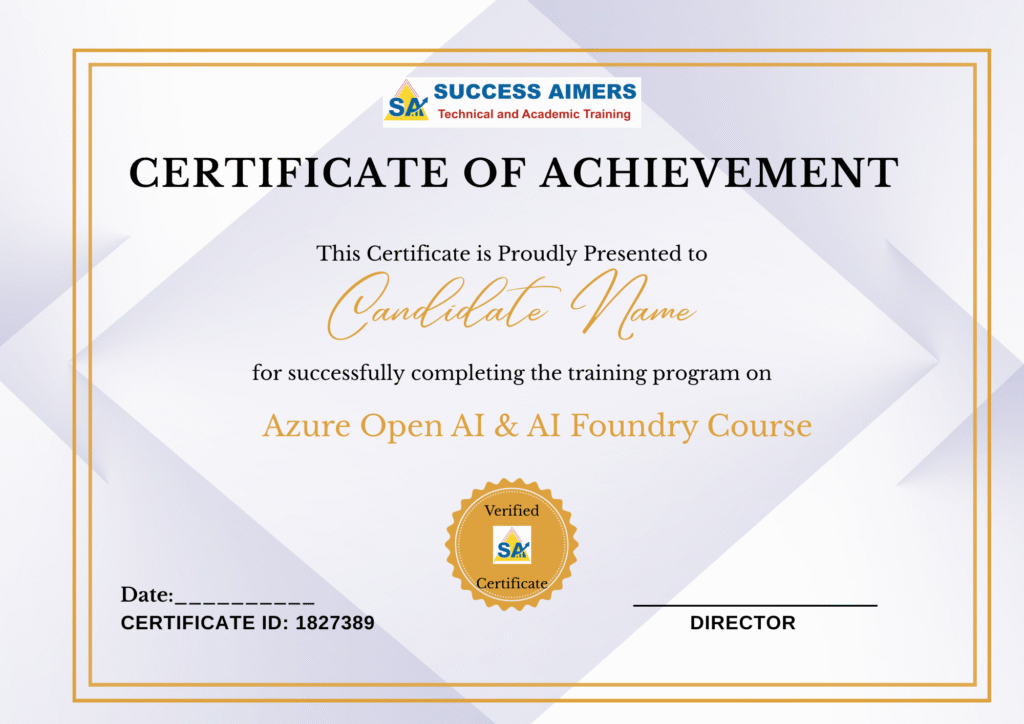
- Get your certificate upon successful completion of the course.
- Certificates for each course
- Gen AI
- Vector DB
- Agentic AI
- Lang Chain
- Lang Graph
- Azure Open AI
- Auto GEN
- Model Context Protocol (MCP)
- AI Governance
- Autonomous Agents
- N8N
- Multimodal RAG's
- Azure AI Foundry

45% - 100%







Designed to provide guidance on current interview practices, personality development, soft skills enhancement, and HR-related questions

Receive expert assistance from our placement team to craft your resume and optimize your Job Profile. Learn effective strategies to capture the attention of HR professionals and maximize your chances of getting shortlisted.

Engage in mock interview sessions led by our industry experts to receive continuous, detailed feedback along with a customized improvement plan. Our dedicated support will help refine your skills until your desired job in the industry.

Join interactive sessions with industry professionals to understand the key skills companies seek. Practice solving interview question worksheets designed to improve your readiness and boost your chances of success in interviews

Build meaningful relationships with key decision-makers and open doors to exciting job prospects in Product and Service based partner

Your path to job placement starts immediately after you finish the course with guaranteed interview calls
Why should you choose to pursue a Azure Open AI/Azure AI Foundry course with Success Aimers?
Success Aimers teaching strategy follow a methodology where in we believe in realtime job scenarios that covers industry use-cases & this will help in building the carrer in the field of AI & also delivers training with help of leading industry experts that helps students to confidently answers questions confidently & excel projects as well while working in a real-world
What is the time frame to become competent as a Azure Open AI engineer?
To become a successful Azure Open AI/Azure AI Foundry Engineer required 1-2 years of consistent learning with dedicated 3-4 hours on daily basis.
But with Success Aimers with the help of leading industry experts & specialized trainers you able to achieve that degree of mastery in 6 months or one year or so and it’s because our curriculum & labs we had formed with hands-on projects.
Will skipping a session prevent me from completing the course?
Missing a live session doesn’t impact your training because we have the live recorded session that’s students can refer later.
What industries lead in Azure Open AI/Azure AI Foundry implementation?
- Manufacturing
- Financial Services
- Healthcare
- E-commerce
- Telecommunications
- BFSI (Banking, Finance & Insurance)
- Travel Industry
Does Success Aimers offer corporate training solutions?
At Success Aimers, we have tied up with 500 + Corporate Partners to support their talent development through online training. Our corporate training programme delivers training based on industry use-cases & focused on ever-evolving tech space.
How is the Success Aimers Azure Open AI/Azure AI Foundry Certification Course reviewed by learners?
Our Azure Open AI/Azure AI Foundry Engineer Course features a well-designed curriculum frameworks focused on delivering training based on industry needs & aligned on ever-changing evolving needs of today’s workforce due to AI.
Also our training curriculum has been reviewed by alumni & praises the thorough content & real along practical use-cases that we covered during the training. Our program helps working professionals to upgrade their skills & help them grow further in their roles…
Can I attend a demo session before I enroll?
Yes, we offer one-to-one discussion before the training and also schedule one demo session to have a gist of trainer teaching style & also the students have questions around training programme placements & job growth after training completion.
What batch size do you consider for the course?
On an average we keep 5-10 students in a batch to have a interactive session & this way trainer can focus on each individual instead of having a large group.
Do you offer learning content as part of the program?
Students are provided with training content wherein the trainer share the Code Snippets, PPT Materials along with recordings of all the batches
Agentic AI Frameworks and Workflow Automation Course in Gurgaon AI is the future innovation with...
Agentic AI with Lang Chain and Lang Graph Training Course in Gurgaon With high-demand of...

AI Agent and Agentic AI Workflows with N8N Course in Gurgaon Master the future of...

AI Infrastructure Scaling and Governance with MCP Certification Course in Gurgaon AI is the future...
AWS Bedrock Training Course in Gurgaon AI is the future innovation with Agentic AI tools...

Databricks Mosaic Agentic AI Training Course in Gurgaon AI is the future innovation with Agentic...
Gen AI Course for Software Testing in Gurgaon: Automation and Quality AI is the future...
Generative AI Certification Course in Gurgaon AI is the future innovation with Agentic AI tools...
Generative AI Course for Business Leaders and Senior Management in Gurgaon Kickstart your carrer in...

Generative AI Course for Cyber Security Professionals in Gurgaon AI is the future innovation with...
Generative AI Course for Software Development and Testing in Gurgaon AI is the future innovation...

Generative AI with Vector Databases and RAG Certification Course in Gurgaon AI is the future...
Google Cloud AI Training Course in Gurgaon AI is the future innovation with Agentic AI...

OpenAI ChatGPT Training Course in Gurgaon AI is the future innovation with Agentic AI tools...

Snowflake Cortex AI Certification Training in Gurgaon Snowflake’s Cortex AI platform offers industry-leading LLMs to...